
Stone Engraving with a Laser: The Complete Guide in 2026
Stone is a tough material, which is why engraving it using a laser engraver is doubtful for some people.
You can engrave stone using a laser engraver. The laser beams are powerful enough to engrave rocks, slate, granite, marble, pebble, ceramics, and similar materials.
Let’s see how laser engraving stone works.
In This Article
- How Does Laser Engraving Stone Work?
- What Type of Laser Engraver Can Engrave Stone?
- What Are the Best Stones for Laser Engraving?
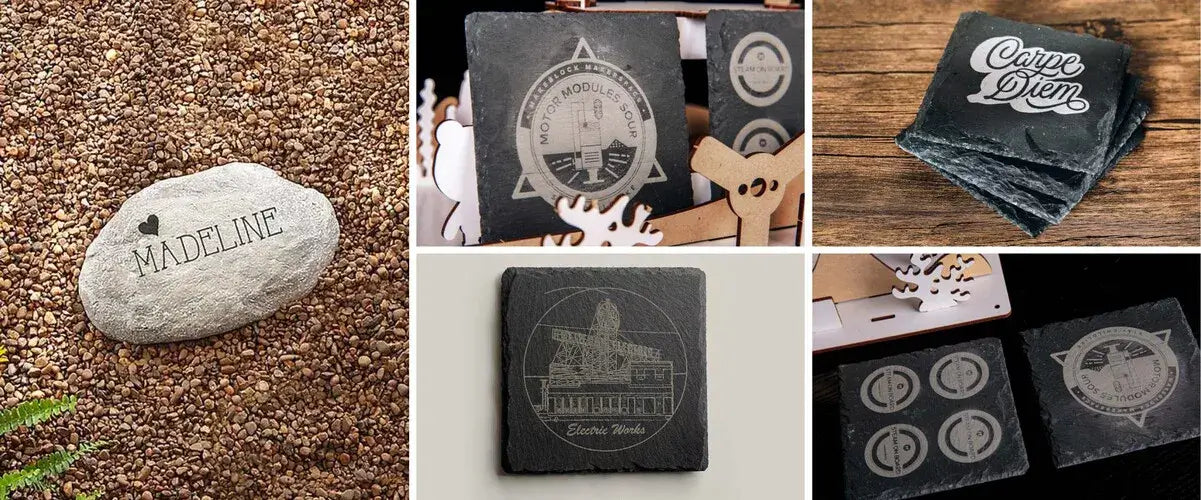
- Stone Laser Engraving Ideas
- Best Laser Engravers for Stone
- Advantages of Engraving Stone Using a Laser Engraver
- FAQs of Laser Engraving Stone
- Conclusion
How Does Laser Engraving Stone Work?
The laser beam works by instantly increasing the temperature of the surface of the stone. Due to the high temperature, the color on the surface of the material changes, or a layer of the surface are removed, leaving a visible mark or tangible depth, depending on the power.
What Type of Laser Engraver Can Engrave Stone?
A CO2 laser engraver is a preferred option for engraving stone. Due to its wavelength, it can be easily absorbed by stone, making it an ideal laser to engrave stones.
Can a Diode Laser Engrave Stone?
A diode laser engraver can also engrave stone. Diode laser engravers are usually less powerful than CO2 laser engravers, but they can also engrave stone, and they are more affordable.
The commonly available diode lasers have a blue light and an optical power of 10-40W. If you need better, faster, and darker engraving, you can go for one above 20W.

XTOOL S1
Diode Laser Engraver for Stone
Best enclosed diode laser. Safe for home use. Ideal choice for both DIY and Business Projects.
Learn MoreCan a Fiber Laser Engrave Stone?
Fiber lasers are very powerful, and they can even cut and engrave metals. They are mostly preferred for metals, but they can also engrave stone. And you get deeper marks at an incredible speed due to the immense power of the laser.

deep stone engraving with xTool F1 Ultra (fiber laser engraver)
What Are the Best Stones for Laser Engraving?
Marble

Laser Engraved Marble Coaster ©DearlyBeelovedLL - Etsy
Marble is one of the favorite stones for laser engraving. You can engrave marble coasters, décor pieces, floor pieces, etc. The laser beam offers clean, fine engraving. You can touch the engraved surface and feel the depth. However, the contrast may be light. Thus, after laser engraving marble, you might want to apply color or paint to make the engraving more visible.
Granite

Laser Engraved Granite Memorial
Due to the appealing appearance of granite, people love to engrave it using a laser machine. It can be processed using a diode or CO2 laser without any hassle. The material can offer contrast after engraving, but it depends on what kind of granite it is. For good contrast, it is better to get black or dark-colored granite.
If you have a light color granite, you might need to paint the engraved area.
Slate

Laser Engraved Slate Coaster
Slate is one of the most common stones engraved using laser machines. It is because slate coasters and small slate pieces are easily available, and the results of slate laser engraving are exceptional.
The engraving contrast on the slates is exceptional. Therefore, laser enthusiasts and business owners like to engrave photos and intricate graphics on slate.
For beginners who mainly want to make personalized slate coasters or small gift items, a craft-oriented machine like the xTool M2 can be a good fit for testing designs and creating customized products in small batches.
RELATED: How to engrave slate coasters?
Pebbles/Cobblestone

Laser Engraved Pebbles
Pebbles are hard, but laser engraving machines allow for deep engraving. The contrast depends on the color of the pebble. If the engraving is too light, you might have to use color or paint.
For home décor and to make décor pieces, it is a good idea to engrave pebbles. It looks great and can be used on tables as a décor piece or paperweight.
XTOOL S1
Laser Engraver for Stone
Best enclosed diode laser. Safe for home use. Ideal choice for both DIY and Business Projects.
Learn MoreBasalt

Laser Engraved Basalt Whiskey Stones ©yanirahappliques - Etsy
A polished and well-finished basalt looks eye-catching. Small basalt stones are used for decoration, massage, spa, etc.
The best thing about laser engraving basalt is the contrast. Without using paint or color, you get clear engraving after processing the stone with a laser machine. You can make intricate designs like Mandala art or write names and make logos.
Laser Settings for Stone Engraving
One of the most common questions makers ask isn't whether stone can be laser engraved, but what settings to use once you're actually standing in front of the machine. Stone is not a uniform material — even two pieces of the same type of granite can behave differently depending on their mineral density, moisture content, and surface finish. Because of this, no single power-and-speed combination works for every project. The numbers below are reliable starting points based on common stone types and xTool's laser categories, not fixed values. Always run a small test engraving on a scrap piece or an inconspicuous corner before committing to your final design.
Why Stone Doesn't Behave Like Wood or Acrylic
Unlike wood, which chars predictably, or acrylic, which melts cleanly, stone reacts to laser energy through thermal ablation (burning away a microscopic layer of the surface) or micro-fracturing (heat causing the crystalline structure just below the surface to fracture, which scatters light differently and creates a visible mark). Which mechanism dominates — and how visible the result is — depends on the stone's mineral composition, hardness, and how polished the surface is. This is why the same power setting can produce a crisp, high-contrast mark on slate but barely leave a trace on a dense piece of granite.
General Settings Reference Table
The table below gives baseline settings for engraving common stone types with a CO2 laser and a diode laser. Treat power as a percentage of the machine's maximum rated output, and always increase passes gradually rather than jumping straight to high power.
| Stone Type | Laser Type | Power | Speed | Passes |
|---|---|---|---|---|
| Slate | CO2 / Diode | 20–35% | Moderate | 1–2 |
| Marble | CO2 / Diode | 10–20% | Fast | 3–5 light passes |
| Granite | CO2 | 30–45% | Slow | 2–4 |
| Basalt | CO2 / Diode | 25–35% | Moderate-slow | 2–3 |
| Pebbles / River Stone | Diode | 15–30% | Moderate | 1–2 |
| Sandstone / Limestone | CO2 / Diode | 15–25% | Fast | 1–2 |
For deeper, more three-dimensional engravings — such as raised text or sculpted detail on stone pendants — a fiber laser like the xTool F1 Ultra can be used at higher power (60–100% of its 20W output) with multiple passes, taking advantage of its high-speed galvo system to build depth efficiently. Fiber lasers excel at this kind of aggressive material removal but generally produce less crisp surface contrast on lighter stones than a CO2 or diode laser does — a trade-off worth keeping in mind depending on whether your goal is depth or visual contrast.
Resolution (DPI) Matters as Much as Power and Speed
Resolution controls how fine the detail in your engraving will be, but it also affects how much heat is concentrated in a small area:
- 150–300 DPI is generally the sweet spot for bold text, logos, and simple line art. It engraves faster and reduces the risk of overheating a small area.
- 400–500 DPI is better suited for photo-realistic images or fine script, but it takes proportionally longer and concentrates more heat. When you push DPI higher, it's worth dropping power slightly to compensate — otherwise you risk scorching or micro-cracking, especially on marble.
Always Run a Test Grid First
Before committing to a final piece, engrave a small grid of squares on a scrap section of the same stone, with power increasing along one axis and speed along the other. Label each square with its settings as you go. This single habit prevents the vast majority of ruined projects — stone is expensive enough, and inconsistent enough between batches, that skipping this step is rarely worth the time saved.
Stone surfaces are rarely perfectly flat, even when they appear polished. A focus offset of just a millimeter can noticeably change how a design renders, particularly at lower power settings on marble or pebbles with curved surfaces. If your machine supports autofocus — like the F1 Ultra's auto-focus system, which continuously adjusts to the material's profile — use it. If not, manually re-check focus at multiple points before running a long or large engraving job.
How to Laser Engrave Stone: Step-by-Step
Once you've chosen a stone and dialed in a starting point for your settings, the actual engraving process follows a predictable workflow. Skipping any of these steps is where most ruined pieces come from — stone is unforgiving in a way that wood and acrylic aren't, since a cracked slab or a doubled, blurry design can't simply be sanded down and redone.
Step 1: Clean and Prepare the Surface
Wipe the stone down to remove dust, oil, and any residue from cutting or shipping. Even a thin layer of dust can scatter the laser beam slightly and soften the edges of your design, especially on fine text or detailed line work. If the stone has a polished finish you want to protect, apply masking tape or transfer tape over the engraving area — this reduces smoke residue and scorch marks on the surrounding surface and can be peeled away cleanly once the job is done.

Step 2: Secure the Stone in Place
Position the stone firmly within the laser bed or honeycomb tray so it cannot shift during the job — even a fraction of a millimeter of movement mid-engrave will produce a visibly doubled or blurred design. For irregularly shaped pieces like pebbles or river stones, use a jig, low-tack tape, or a rotary attachment if you're engraving a curved or cylindrical surface. Flat stones like slate or marble tiles typically just need to sit flush against the bed.

Step 3: Import and Position Your Design
Load your design — text, a logo, or an image — into your laser software (such as xTool Studio) and position it precisely where you want it engraved. Use the camera preview function, if your machine has one, to see exactly how the design will land on the material before you commit. For photo engravings, converting the image to grayscale and adjusting contrast beforehand often produces a cleaner result than relying on the software's default processing.
Step 4: Run a Test Grid on Scrap Material
Before engraving the final piece, run a small test grid on a scrap section of the same stone — or a hidden corner of the actual piece, if scrap isn't available. A test grid is simply a small matrix of squares, each engraved at a slightly different power and speed combination, so you can see exactly how that specific piece of stone responds before committing to the real design. Label each square with its settings as you go. This one habit prevents the majority of failed stone projects, since even stones from the same supplier batch can vary in density and behavior.
Step 5: Engrave in Layers, Not One Aggressive Pass
For most stones except slate, several light passes produce cleaner, more controllable results than a single high-power pass. Each pass removes a small, controlled amount of material or causes a small amount of controlled fracturing, which lets you visually check progress and stop exactly when the contrast and depth look right — rather than committing irreversibly to one aggressive pass. This is especially important on marble and other softer stones, where the margin between "not deep enough" and "cracked" can be narrow.

Step 6: Clean Up and Apply a Sealant (Especially for Outdoor Pieces)
Once engraving is complete, remove any masking tape immediately while the surface is still warm — residue left too long is harder to clean off. Wipe away engraving dust with a damp cloth rather than an abrasive cleaner, which can dull the surrounding polish. For pieces that will live outdoors — garden markers, memorial stones, or signage — apply a clear stone sealant (the same category of product used to seal natural stone countertops) once the surface is completely clean. This protects the engraving from weather, dirt, and general wear, and significantly extends how long the design stays sharp and legible.
Stone Laser Engraving Ideas?
You can engrave a wide range of objects that are made from stone. But there are some favorite items you can try as they are hot-selling and profitable.
Laser Engraved Stone Photos

You can easily engrave your photo or any picture you like on stones.
It does not matter how detailed the picture is; the laser machine can engrave the tiniest details, making engraved stone photos excellent gifts for weddings, anniversaries and other occasions.
Laser Engraved Slate Coasters
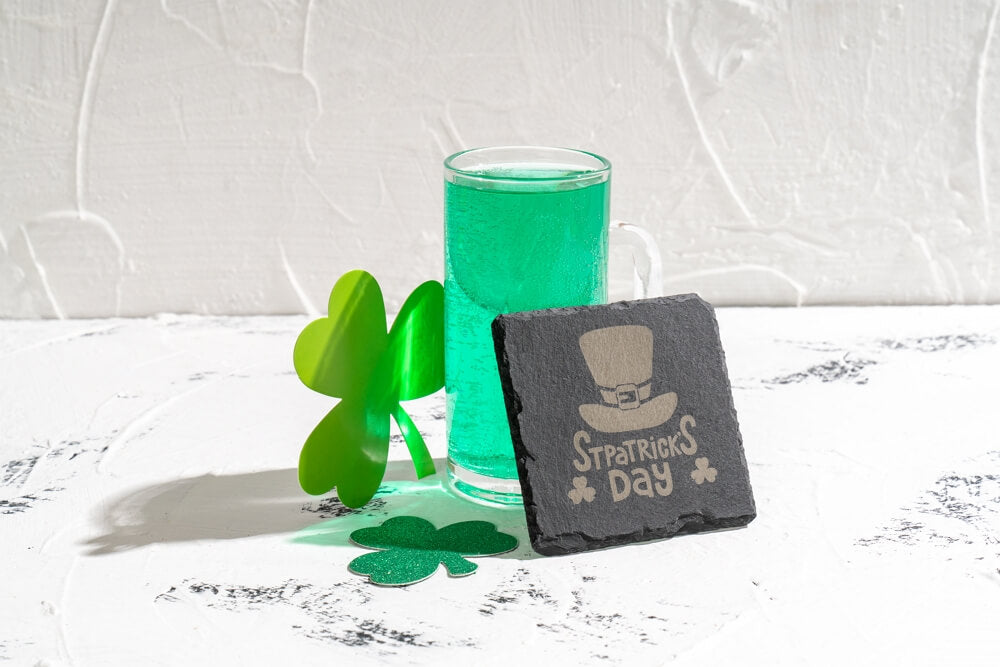
These coasters are available on the market, so you only need to engrave them. You can engrave a photo, quote, logo, or anything you like. It is a perfect idea for beginners.
XTOOL S1
Laser Engraver for Stone
Best enclosed diode laser. Safe for home use. Ideal choice for both DIY and Business Projects.
Learn MoreCustomized Ceramic Mugs

Drinking tea or coffee in a personalized mug is a worthy experience. You can also make personalized mugs using a laser engraving machine. You can engrave whatever you like.
For creators who make personalized mugs, cups, and other gift products, the xTool M2 can be a practical craft machine for small custom orders, especially when you are turning names, logos, photos or seasonal artwork into personalized pieces without jumping between too many tools.

Best Laser Engravers for Stone
xTool F1 Ultra: The Best Fiber Laser Engraver for Stones
If you want to create deep engravings, depressions, or intricate 3D patterns on stone, the xTool F1 Ultra is the ultimate choice – it is the world’s first compact fiber and diode laser engraver. Its 20W fiber laser power makes engraving stone as easy as carving a soft candle.

Deeper engravings often take time, but not with the F1 Ultra. Its impressive engraving speed of 10,000 mm/s ensures your designs are completed in just minutes. No more long waits to create your favorite stone pendants.
The F1 Ultra's top engraving speed is thanks to its advanced galvo-laser technology. It’s also the largest desktop galvo laser engraver available, with a working area of 220 x 220 mm. That too is expandable to 220 x 500 mm through an auto conveyor system. This system allows for multiple objects to be batch engraved efficiently.

Engraving stones can be challenging due to their uneven and curved surfaces. The xTool F1 Ultra addresses this with its smart auto-focus system that continuously adjusts to match the material’s profile. This ensures that curved engravings are as precise and detailed as flat ones.
Safety is a key consideration with the 20W fiber laser of the F1 Ultra. xTool has designed this machine with comprehensive safety features, including an enclosed design, a laser-filtering lid, and an efficient exhaust system to evacuate fumes.
The operation is simple, place the material inside, and the machine autofocuses onto materials according to its height. Drag the design and start engraving. Since the machine features a built-in touch control system and 7GB storage, you may not need to connect it to a separate device. You can save you projects inside and directly process from the machine itself.
Advantages of Engraving Stone Using a Laser Engraver
There are other ways of engraving stone, such as drilling. However, a laser engraver is the best option for stone engraving. Let’s discuss why.
1. No Wear and Tear
The first benefit of laser engraving is no wear and tear. Engraving with drills and chisels is quite difficult, and mostly, people end up damaging the object.
If you are doing it with your hand, it is quite difficult to control the force. There can be cracks and other wear and tear on the object. Even if you are using a CNC drilling machine, there are chances of wear & tear because there is physical contact.
When you engrave a stone with a laser engraving machine, there is no physical contact made between the machine and the object. Therefore, there is no wear and tear on the object.
2. Quick Results
Laser engraving machines are very fast. They engrave stones in no time.
If you are using a powerful machine, such as the xTool F1 Ultra, then the speed can be up to 10,000mm/s or more, depending on the type of the machine and the optical power. The engraving can be done in one only pass without any pre and post treatments.
3. Incredible Accuracy
The accuracy of laser engraving machines is phenomenal. It does not matter how fine the details are; the machines are very accurate. Their sturdy design, positioning sensors, and accurate motors keep the engraving as accurate as possible.
With some laser machines, the accuracy can be up to 0.0004 inches, which means you won’t see any errors or defects. The repositioning accuracy can be up to 0.0007 inches. Therefore, the laser returns to the same point if needed, and there won’t be any noticeable error.
4. Intricate Designs
Using CNC drills and traditional methods, you cannot engrave very intricate designs. Due to the physical contact, the object can be damaged if the design is too small and intricate.
However, with a laser engraving machine, you can engrave without any worries. The laser spot of the machines is usually smaller than 0.10 x 0.10mm. You can engrave any type of design, irrespective of its complexity and size. The laser machine will offer perfect results.
5. Waste-free Process
There is almost no or very little waste when you engrave stone using a laser. Mostly, the laser marks stones and does not remove the material. But even if it removes some material, it will be very minimal.
FAQs of Laser Engraving Stone
Can you laser engrave sandstone?
Yes, you can laser engrave sandstone through a CO2 or Diode laser machine. These stones have natural grains, patterns, and color contrast; therefore, people like to process them using a laser machine. However, you need to paint the engraved area to make it visible and clear.
Can you laser engrave marble?
Yes, you can easily laser engrave a marble. It is frequently done to customize marble pieces for décor and other purposes. You can choose any kind of marble you like. The engraving will be deep, but you need to use color for the engraved area.
Can brick be laser engraved?
Bricks can be laser engraved, but due to the hardness of the brick and heat treatment, it won’t be deep. We can call it laser etching or marking. It will offer a good contrast.
Can quartz be laser engraved?
Due to the reflective property of quartz, there are limited options when it comes to laser machines. Only a CO2 laser machine can do that. So, it is possible to laser engrave quartz, but you have to select a 10,600nm CO2 laser engraver.
Can you laser engrave granite?
Yes, granite can be laser engraved. The engraving is deep, and the contrast depends on the color of the granite.
Can you laser engrave concrete?
Yes, you can laser engrave concrete or concrete pavers. But keep in mind the contrast will be very light, but still visible.
What laser settings for engraving on stone?
You have to do trials to get the best settings for different types of stones. It depends on the laser machine you are using as well as the material. Run a power-speed test on spare material to figure out the optimal settings.
Conclusion
Using a laser engraving machine, you can easily engrave ceramics, slates marbles and other stones. It offers incredible results in no time.
You can use fiber, CO2 or Diode laser machines for engraving stones. Diode laser machines are quite affordable and suitable for DIY projects. You can grab a suitable machine and start engraving stones and other materials.
We have discussed xTool F1 Ultra, a dual fiber and diode laser engraver. It is equipped with extraordinary features and are ideal for engraving stones, ceramics, metals, and other materials.
You make things. We make it easier.
Weekly inspiration for laser, print, and craft projects.
For more questions, please join our community to get inspired!

